
When Email Fails, Customers Still Wait
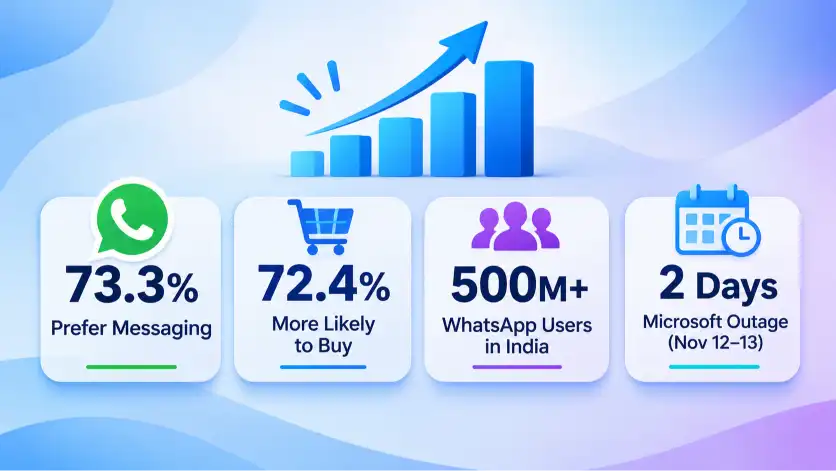
Microsoft’s global outage on November 12-13 disrupted Outlook and Teams for businesses worldwide, and Microsoft said it was not a hack. A Meta-commissioned Kantar survey found 73.3% of consumers prefer messaging when contacting a business, and WhatsApp has over 500 million users in India. When business email fails, WhatsApp, social media, and your website keep customers informed.
Why Messaging Works When Email Fails
An email outage is a business continuity problem, not just an IT problem. Customers don’t know why you’ve gone silent, so silence feels like neglect. A short WhatsApp Business or social media message, sent quickly, protects trust until email returns.
- 73.3% of consumers prefer messaging when contacting a business, per Kantar for Meta
- 72.4% are more likely to buy from a brand that offers messaging
- India is WhatsApp’s largest market, with 500 million+ users
- The Microsoft 365 outage began Thursday, Nov 12, and recovery continued into Friday
- A clear message early reduces repeat calls, complaints, and lost orders
Alternative communication channels help businesses maintain customer relationships during unexpected disruptions. WhatsApp Business, Facebook, Instagram, and website contact forms keep customers connected when email is unavailable.
Start learning journey with Bigpage

The "We're Aware and Working On It" Update
Tell customers what’s happening before they ask. Microsoft publicly apologised and confirmed there was no hack, the kind of early clarity customers want. Say that email is down, how to reach you now, and when you’ll update again.
Sample message: “Hi [Name], our email is facing a technical issue. Your order and enquiry are safe. For urgent help, message us here on WhatsApp. We’ll update you by 5 PM.”
- State the problem in one plain sentence
- Give the new contact route
- Promise the time of your next update
- Post the same notice on Facebook, Instagram, and your website

The Order Or Booking Confirmation
Customers still need proof that their order, booking, or enquiry was received. IndiaMART raised buyer conversion by 33% and cut complaint volume by 60% after replacing call-based enquiry verification with WhatsApp, according to AiSensy.
Sample message: “Hello [Name], we’ve received your order #1234 for [item]. Expected delivery: [date]. Reply here for any changes.”
- Include the order or booking number
- Add the date, time, or delivery estimate
- Keep the message under 40 words
- Save it as a quick reply in WhatsApp Business

The Payment And Invoice Message
Invoices and payment links often travel by email, so an outage can slow your cash flow. Send payment details by WhatsApp and confirm every payment in writing, so customers know you received it and disputes stay rare.
Sample message: “Hi [Name], here is your invoice for ₹[amount]. Pay securely using [official UPI ID or link]. We’ll confirm once received. Please never share OTPs or card details.”
- Share the invoice as a PDF or clear image
- Use only your official UPI ID or payment link
- Never ask for OTPs, passwords, or card details
- Send a confirmation once payment arrives

The "Here's How To Reach Us" Support Message
Customers need one clear place to ask questions. Publish your WhatsApp number, Facebook page, or Instagram profile as the temporary support channel. WhatsApp Business also offers greeting messages, away messages, and quick replies that set expectations automatically.
Sample message: “Our team is replying on WhatsApp today. Tap here to chat: [link]. Typical reply time: 30 minutes.”
- Pin the notice on your Facebook page and Instagram bio
- Add a banner to your website homepage and contact page
- Use greeting and away messages in WhatsApp Business
- Assign one team member to monitor all messages

The Follow-Up After Email Returns
When service returns, tell customers and clear the backlog. Even after Microsoft said email was approaching normal levels, delayed messages can linger. Apologise briefly and ask whether anything is still pending to close the loop and rebuild confidence.
Sample message: “Hi [Name], our email is working again. If you wrote to us since Thursday and haven’t heard back, please reply here and we’ll prioritise it. Thank you for your patience.”
- Announce that email is working again
- Ask customers to resend anything unanswered
- Reply to urgent and paid customers first
- Review what went wrong and update your outage plan
Prepare Your Business Before The Next Email Outage
Use this checklist to set up backup channels today, so one failed service never leaves your customers waiting without answers.
- Set up WhatsApp Business with your profile, hours, and catalog
- Save the five messages above as quick replies
- Add a backup contact route to your website footer
- Check that your email provider has a status page and support number
- Share your backup channel with customers before an outage happens
- Assign one person to send updates during any outage

Conclusion
Email will fail again at some point, but your customer communication doesn’t have to. A few ready-to-send WhatsApp and social media messages keep customers informed and protect both trust and sales.
Prepare them today, and the next outage becomes a small inconvenience instead of a crisis.
Bigpage can help you to grow your business digitally through well-defined website content, building an NGO Website, Dynamic website for you to enhance your online presence and get more clients through various Facebook, Instagram Ads

Agrodut is a managing director and seasoned digital marketing specialist passionate about SEO. With 15 years of experience, he has helped numerous businesses elevate their online presence and achieve higher search engine rankings. A results-driven professional, Agrodut Mondal stays updated with the latest SEO trends and best practices to ensure cutting-edge strategies. When not optimising websites, he enjoys exploring new technology and sharing insights through writing and speaking engagements. Connect with Agrodut for expert guidance on unlocking your website’s full potential in the digital.